
In today’s digital-first world, every task—from browsing social media to managing billion-dollar enterprises—relies on computer software. Software is what transforms raw hardware into a functioning system. Without it, even the most powerful computer would be a silent, lifeless box.
But software isn’t one-size-fits-all. There are different types of computer software, each serving a unique purpose. Some provide the foundation for a device to run, others deliver applications we use daily, and another category exists purely to help developers build even more software.
In this guide, we’ll break down the three main types of computer software, explore how they work, look at real-world examples, and examine how software is evolving with technologies like artificial intelligence and cloud computing.
Whether you’re a student, tech enthusiast, or professional, this comprehensive overview will help you understand the building blocks of our digital world.
What Is Computer Software?
At its core, computer software is a set of instructions that tell a computer how to perform specific tasks. Unlike hardware—the physical components such as CPUs, keyboards, and monitors—software is intangible such as Microsoft Word, Zoom and printer drivers. It exists as code and algorithms stored in memory or storage devices.
Examples of Hardware vs. Software:
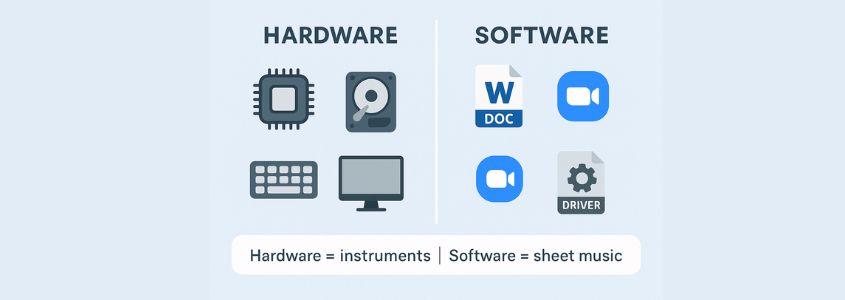
Analogy: Think of a computer as a symphony orchestra. Hardware is the collection of instruments, while software is the sheet music directing when and how each instrument plays. Without the sheet music, the orchestra produces no music—just like hardware without software produces no useful output.
How Computer Software Works
Software functions through four fundamental stages:
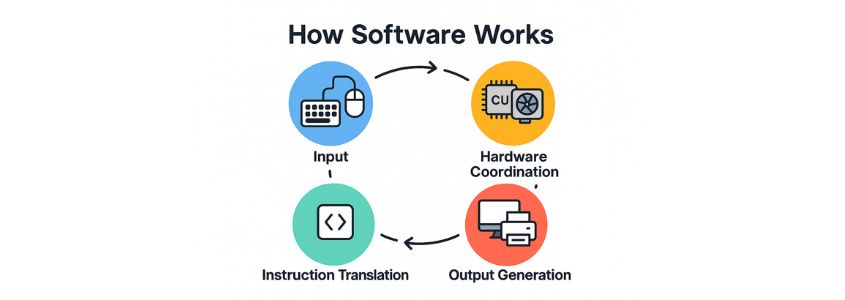
- Input Processing – Users provide input through devices like keyboards, Mice, or voice commands.
- Instruction Translation – The software converts this input into machine-readable code.
- Hardware Coordination – The instructions tell hardware components what to do.
- Output Generation – Results are displayed on screens, speakers, or other output devices.
The Three Main Types of Computer Software
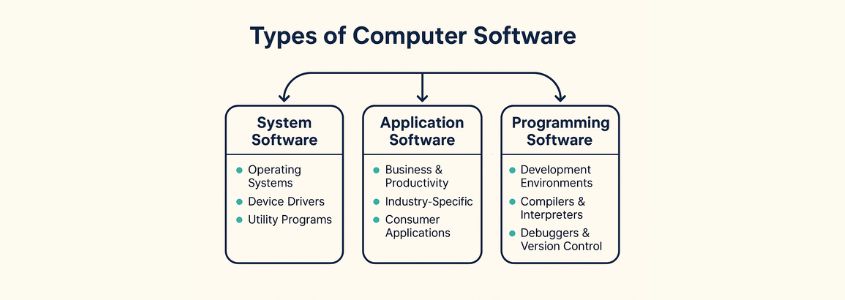
There are three primary categories of software: system software, application software, and programming software. Each plays a distinct role in the computing ecosystem. Let’s understand them one by one.
1. System Software
System software acts as the foundation. It manages hardware resources, ensures smooth communication between devices, and provides the platform for other programs to run. One of the best examples can be an operating system.
Operating Systems (OS)
It is most critical system software component, manages memory, processes, storage, and user interfaces. Windows, Linux, macOS/iOS and Android the real-life examples of operating system.
Device Drivers
Device drivers are specialized pieces of system software that allow the operating system to communicate with hardware components. Without them, your computer wouldn’t know how to use its own hardware—even if the hardware is physically installed. Drivers act as “translators,” converting OS instructions into a language the hardware understands.
Examples:
- Display/Graphics Drivers: Enable the operating system to communicate with the GPU for rendering images, videos, and graphics.
- Printer Drivers: Convert computer instructions into commands a printer can understand to produce physical output.
- Network Drivers: Allow the OS to connect and interact with wired or wireless network hardware for internet access.
- Sound/Audio Drivers: Manage audio input and output between the OS and sound hardware like speakers and microphones.
- Storage Drivers: Facilitate communication between the OS and storage devices such as HDDs, SSDs, and external drives.
- Peripheral Drivers: Control external devices like keyboards, mice, webcams, and scanners to ensure proper functionality.
Utility Programs
Utility programs are specialized system software designed to optimize, secure, and maintain computers. While they don’t directly perform user tasks like word processing or web browsing, they keep the system running smoothly behind the scenes. Think of them as digital “mechanics” that clean, tune, and protect your machine.
Examples:
- Antivirus and Security Tools: Protect systems from malware and cyber threats with real-time scanning (e.g., Norton, McAfee, Windows Defender, Kaspersky).
- Disk Cleanup and Optimization Tools: Remove junk files and optimize storage for better performance (e.g., Windows Disk Cleanup, CCleaner, Defraggler).
- Backup and Recovery Utilities: Safeguard data by creating copies and enabling recovery after crashes or loss (e.g., Acronis True Image, Time Machine, Windows Backup).
- File Compression Utilities: Shrink and archive files for easier storage and sharing (e.g., WinRAR, 7-Zip, WinZip).
- System Monitoring and Diagnostic Tools: Track performance metrics and identify hardware/software issues (e.g., Task Manager, Activity Monitor, HWMonitor).
- Encryption and Privacy Tools: Secure files and communications through data encryption (e.g., VeraCrypt, BitLocker, AxCrypt).
- Uninstallation and Cleanup Tools: Completely remove unwanted apps and leftover files (e.g., Revo Uninstaller, IObit Uninstaller).
👉 Why it matters: Without system software, your computer wouldn’t even boot up.
2. Application Software
Application software is the software most people interact with daily. Unlike system software, which runs in the background, applications are built to help users accomplish specific tasks—whether that’s writing a report, designing a building, managing a business, or streaming music.
- Business and Productivity Applications: Designed to boost efficiency by helping teams manage documents, projects, and communication.
Examples: Microsoft Office, Slack - Industry-Specific Applications: Built for the unique needs of specialized sectors such as healthcare, finance, and engineering.
Examples: Epic EHR, AutoCAD - Consumer Applications: Focused on everyday personal use, from web browsing to streaming and social networking.
Examples: Chrome, Netflix
3. Programming Software
Programming software exists to help developers create, test, and refine software applications. Just as a writer needs pens, paper, and editing tools, programmers need specialized software that makes coding more efficient, accurate, and organized. Without these tools, writing software would be slow, error-prone, and almost impossible at scale.
Development Environments
A development environment is the space where coding happens. These tools give programmers a structured setup for writing, testing, and managing code.
- Integrated Development Environments (IDEs):
IDEs like Visual Studio Code, IntelliJ IDEA, and Eclipse are like fully equipped workshops. They combine everything a developer needs—code editor, debugger, compiler integration, and project management—into a single platform. IDEs often include features like auto-completion, syntax highlighting, and error checking, which help beginners learn faster and professionals code more efficiently. - Lightweight Code Editors:
Tools like Sublime Text, Atom, or Vim are closer to compact toolboxes. They don’t come with all the built-in features of an IDE, but they are fast, customizable, and beloved by developers who prefer simplicity and flexibility. With plugins, they can be expanded into powerful setups while staying lean.
👉 Analogy: An IDE is like a fully furnished workshop with every power tool at hand. A code editor is like a portable toolbox—smaller, lighter, and preferred by those who like to set up their own workspace.
Compilers and Interpreters
Writing code in a programming language (like C++, Java, or Python) is like writing instructions in English. But computers don’t understand English—they only understand machine code (binary). This is where compilers and interpreters come in.
- Compilers: Translate the entire program into machine code before it runs.
- Examples: GCC (C/C++), Java compiler.
- Metaphor: A compiler is like a translator who rewrites an entire book into another language before anyone reads it. Once translated, it can be read quickly and repeatedly.
- Interpreters: Translate and execute code line by line, in real time.
- Examples: Python interpreter, Ruby interpreter.
- Metaphor: An interpreter is like a live translator who translates each sentence as it’s spoken, making it immediate but sometimes slower overall.
Brief Expansion: Other Essential Tools
- Debuggers: Debugging tools help developers identify and fix errors (“bugs”) in code. They allow step-by-step execution, variable inspection, and error tracking—like a detective uncovering clues to solve a mystery.
- Version Control Integration: Tools like Git (often managed through GitHub or GitLab) are built into many programming environments. They track changes, let teams collaborate on code, and provide backups—like Google Docs for programmers but with far more power.
👉 Professional Insight: Developers who master their tools are up to 60% more productive than those who don’t.
Key Characteristics of Computer Software
When we talk about software, it’s not just about the apps or programs we see on screen—it has certain defining traits that make it different from hardware. Let’s break them down:
- Intangible: Unlike hardware such as a keyboard or a monitor, software doesn’t have a physical form. It exists as lines of code stored in memory or on a hard drive. You can’t touch Microsoft Word or Spotify, but you can see and use them because the instructions written in code tell the hardware what to do.
- Hardware Dependent: Software cannot run on its own—it needs a physical device to function. A mobile app requires a smartphone, and a video game needs a computer or console. Without the hardware, the software is like a car without a road—it has potential but no way to move.
- Scalable: Once created, software can be easily duplicated and shared with millions of users without needing new factories or materials. For example, when WhatsApp releases an update, it can instantly reach users worldwide through app stores. This scalability is what makes software so powerful in a digital economy.
- Updatable: One of the greatest strengths of software is that it can evolve over time. Developers release updates to add features, fix bugs, or improve security. Think about how your phone receives regular updates—each one makes the device smarter and more secure without you having to buy new hardware.
Quality Attributes of Computer Software
Beyond its basic characteristics, good software is judged by its quality. Here are four important attributes that determine how effective software is in real-world use:
- Reliability: Reliable software performs consistently under different conditions. For example, Google Maps needs to give accurate directions every time—if it failed often, people would stop trusting it. Reliability is about building confidence in the tool.
- Maintainability: Software should be easy to modify and improve. Developers often revisit old code to add features or fix problems, so well-structured software saves time and effort. A practical example is how online learning platforms like Moodle can be updated to support new teaching methods without having to start from scratch.
- Security: With increasing cyber threats, security is a non-negotiable quality. Secure software protects user data and prevents unauthorized access. For instance, online banking apps use encryption to safeguard sensitive financial information from hackers.
- Usability: Even the most powerful software is useless if people can’t figure out how to use it. Usability is about intuitive design and a smooth user experience. Apps like Spotify succeed not only because of their music library but also because the interface is simple and easy to navigate, even for new users.
👉 Takeaway: Software may be invisible, but it has clear traits and quality standards that determine how well it serves users. From being intangible yet scalable to balancing reliability, security, and usability, these characteristics explain why some programs succeed and others fail.
A Brief History of Computer Software
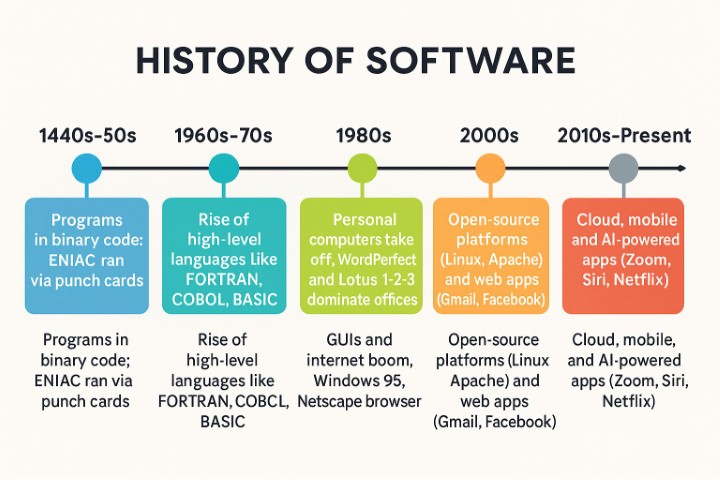
The journey of software spans less than a century, yet its impact has transformed every aspect of modern life. From clunky machine code in the 1940s to today’s AI-driven apps, here’s how software evolved through the decades:
1940s–1950s: The Dawn of Programming
In the early days of computing, programs were written directly in binary machine code—strings of 0s and 1s that the computer could process. This was time-consuming, error-prone, and limited to experts. Assembly language soon followed, using short text commands instead of raw binary, making programming slightly more manageable.
- Example: The ENIAC computer (1945) ran programs coded manually with switches and punch cards.
1960s–1970s: The Rise of High-Level Languages
To make coding more accessible, high-level languages like FORTRAN (for scientific calculations), COBOL (for business), and BASIC (for beginners) were introduced. These allowed programmers to write instructions closer to human language, which compilers then translated into machine code.
- Impact: Software development became faster and more widespread, opening the door for universities, businesses, and government agencies to adopt computing.
1980s: The Personal Computer Revolution
The arrival of affordable personal computers (PCs) brought software into homes and small businesses for the first time. Applications like WordPerfect and Lotus 1-2-3 made word processing and spreadsheets widely available. Operating systems such as MS-DOS and early versions of Mac OS also shaped how users interacted with computers.
- Impact: Software was no longer just for scientists or corporations—it became part of everyday life.
1990s: Graphical User Interfaces and the Internet Boom
The 1990s saw the mainstream adoption of graphical user interfaces (GUIs), thanks to systems like Microsoft Windows and Apple’s macOS. Instead of typing commands, users could now click icons and use menus. At the same time, the rise of the World Wide Web transformed software into a global connector.
- Examples: Windows 95, Netscape Navigator (early web browser).
- Impact: Computing became easier, more visual, and more connected than ever before.
2000s: The Internet and Open Source Era
With high-speed internet spreading worldwide, software shifted toward online platforms and services. The open-source movement (e.g., Linux, Apache) gained traction, encouraging collaboration and free distribution of code. Web applications like Gmail and Facebook reshaped communication, while enterprise software moved to large-scale internet-based systems.
- Impact: Software became less about single PCs and more about connected ecosystems.
2010s–Present: Cloud, Mobile, and Artificial Intelligence
Smartphones brought mobile apps into daily life, while cloud computing made it possible to access powerful software from anywhere without installing it locally. Services like Google Drive, Dropbox, and Zoom run entirely online. At the same time, artificial intelligence began shaping modern applications—from voice assistants like Siri and Alexa to recommendation engines on Netflix and Amazon.
- Impact: Software is now global, always connected, and increasingly intelligent.
👉 Looking Ahead: As we move into the 2020s and beyond, emerging technologies like quantum computing, machine learning, and immersive software (AR/VR) will define the next chapter. Just as the leap from binary code to mobile apps changed the world, the next breakthroughs will push software into even more transformative directions.
Real-World Applications of Software
Software isn’t just something running in the background—it actively shapes how industries operate, innovate, and deliver value. Let’s look at a few key sectors to see how software makes a difference in everyday life and global business.
Healthcare
In healthcare, software improves both patient outcomes and operational efficiency. Electronic Health Records (EHRs) store and organize patient data digitally, making it easier for doctors to access medical histories and coordinate care. Telemedicine platforms allow patients to consult with doctors remotely, which became especially important during the COVID-19 pandemic. Diagnostic imaging software, such as MRI and CT scan applications, helps specialists analyze images with precision and speed.
- Example: Epic Systems, one of the largest EHR providers, allows hospitals to share patient records securely across different facilities.
👉 Why it matters: Software reduces paperwork, saves time, and makes healthcare more accessible and accurate.
Financial Services
Banks and financial institutions rely heavily on software for security, speed, and accuracy. Real-time stock trading platforms execute millions of transactions within seconds, giving investors up-to-the-minute market access. Risk management and compliance systems track suspicious activities and ensure institutions follow strict financial regulations. Meanwhile, mobile banking apps let users deposit checks, transfer money, or pay bills with a few taps on their phones.
- Example: Robinhood enables users to buy and sell stocks instantly from a mobile device.
👉 Why it matters: Software ensures that financial systems remain fast, secure, and accessible to both professionals and everyday users.
Education
In education, software is transforming how students learn and teachers teach. Learning Management Systems (LMS) like Moodle and Canvas allow educators to share lessons, assign homework, and track student progress online. Virtual classrooms make it possible for students across the world to join the same lecture in real time. Student information systems manage records, grades, and attendance, simplifying administrative work for schools and universities.
- Example: Zoom and Google Classroom became essential tools during remote learning, keeping classes running smoothly.
👉 Why it matters: Software makes learning flexible, accessible, and more personalized for students.
Manufacturing
Manufacturers use software to streamline production and cut waste. Enterprise Resource Planning (ERP) systems integrate everything from supply chain logistics to accounting, ensuring that resources are used efficiently. Production line automation software controls machines on the factory floor, reducing human error and boosting output. Quality tracking and reporting tools monitor every stage of production to maintain high standards.
- Example: SAP ERP helps global manufacturers manage inventory, production, and customer orders all in one platform.
👉 Why it matters: Software boosts productivity, lowers costs, and helps companies maintain consistent product quality.
The Big Picture
Across industries, the impact of software is clear: businesses that adopt advanced tools often see 30–50% improvements in efficiency and 20–35% fewer errors. Whether it’s improving patient care, enabling faster financial transactions, making learning more accessible, or streamlining factory production, software drives innovation and progress.
👉 In short: Software is not just a tool—it’s the engine powering modern industries.
Hardware vs. Software: A Comparison
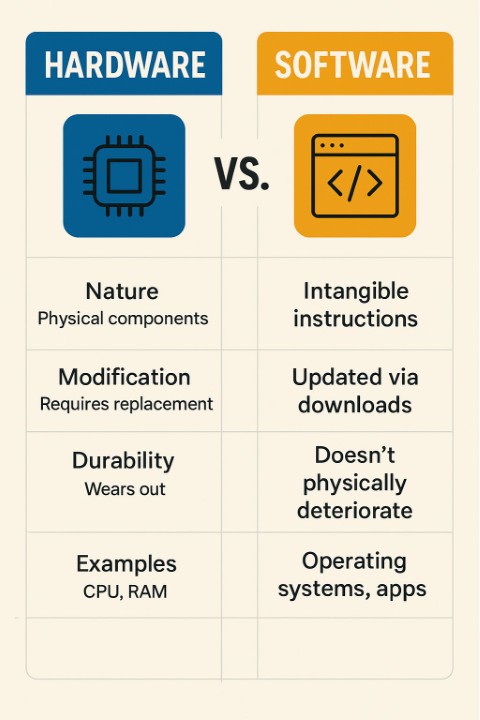
| Aspect | Hardware | Software |
|---|---|---|
| Nature | Physical components | Intangible instructions |
| Modification | Requires replacement | Updated via downloads |
| Durability | Wears out over time | Doesn’t physically deteriorate |
| Development Speed | Months to years | Days to months |
| Failures | Electrical or physical | Logic errors, bugs |
| Examples | CPU, RAM, hard drive | Operating systems, apps |
The Future of Computer Software
Software has already transformed how we live and work, but the next decade will bring even bigger changes. From artificial intelligence to sustainability, tomorrow’s software will be smarter, faster, and more environmentally responsible. Let’s explore four major trends shaping the future.
Artificial Intelligence Integration
Artificial intelligence (AI) is becoming a core part of software. Today we already see AI in action—think of chatbots like ChatGPT, recommendation engines on Netflix, or virtual assistants like Siri and Alexa. Future software will go even further with predictive tools that anticipate user needs, natural language processing that enables smoother conversations with machines, and autonomous systems like self-driving cars.
👉 Why it matters: AI will help software move from being reactive (waiting for user input) to proactive (offering solutions before you even ask). Imagine medical apps that detect health issues before symptoms appear or business tools that predict supply chain delays before they happen.
Cloud-Native Architecture
The cloud is no longer just a place to store photos—it’s becoming the backbone of modern software. Cloud-native architecture means building software specifically for the cloud using approaches like microservices (breaking apps into smaller, independent parts), containerization (packaging apps so they run anywhere), and serverless computing (software that automatically uses computing power without needing companies to manage servers).
👉 Analogy: Instead of owning a power plant to generate electricity, you simply plug into the grid when needed. That’s what cloud-native software does for computing.
👉 Why it matters: Businesses and users benefit from faster updates, more reliable apps, and services that can scale instantly—whether it’s a streaming service handling millions of viewers or an online store managing a sudden holiday shopping rush.
Enhanced Security
As software becomes more powerful, cyber threats are also becoming more sophisticated. The future of software will lean heavily on zero-trust security (where no user or device is trusted by default), privacy-first software that gives people more control over their data, and even quantum-proof encryption—security strong enough to withstand the power of quantum computers, which could break today’s encryption methods.
👉 Example: Imagine logging into a bank account in the 2030s. Instead of just a password, multiple layers of AI-driven checks will quietly verify your identity—your typing style, your location, and even biometric data like voice patterns.
👉 Why it matters: Stronger security will protect individuals, businesses, and governments in a world where digital systems are critical to daily life.
Sustainable Computing
With billions of devices and data centers consuming massive amounts of electricity, software will need to become more environmentally conscious. The future will see energy-efficient algorithms that require less computing power, green software engineering practices that prioritize sustainability, and better resource management across cloud systems.
👉 Example: Streaming platforms might use smarter algorithms to deliver video quality that balances clarity with lower energy use, saving power across millions of users.
👉 Why it matters: As climate change pressures mount, sustainable software will be just as important as renewable energy and eco-friendly hardware. It ensures that our digital world grows without putting extra strain on the planet.
Looking Ahead
By 2030, experts predict that 80% of new software will include AI capabilities, and 90% of enterprise applications will be cloud-native. These trends will redefine how we work, learn, and live—bringing smarter healthcare, more secure financial systems, greener digital infrastructure, and everyday apps that anticipate our needs.
👉 The big picture: The future of computer software isn’t just about better technology—it’s about shaping a smarter, safer, and more sustainable society. Software will continue to be the invisible engine driving innovation, but its influence on our daily lives will be more visible than ever.
Conclusion
All computer software can be grouped into three main categories: system software, application software, and programming software. Each plays a unique role—system software provides the foundation, application software brings technology into our daily lives, and programming software equips developers to create it all. Together, they form the invisible framework that powers the modern digital world.
Even as new technologies like artificial intelligence, cloud computing, and sustainable software engineering reshape the landscape, these categories remain essential. They explain not just how computers work, but also how innovation continues to build on the same core principles.
👉 The bottom line: Software may be intangible, but its impact is everywhere. By understanding its types and how they connect, students, professionals, and everyday users gain a clearer perspective on technology—and the confidence to use it, build with it, and shape the future it creates.