
Have you ever asked yourself, “What is a computer?” but felt too confused to find the answer?
Maybe you’re just starting to learn computers in school or preparing for a basic computer course.
The good news is — understanding computers is easier than you think! Once you know the basics, you’ll see how useful and exciting they can be in your studies, hobbies, and even your future career.
Is “COMPUTER” an Acronym?
The word “computer” actually comes from the word “compute,” meaning to calculate. But for fun, people sometimes create a backronym (an acronym made after the word was already in use). Here’s one:
C – Common
O – Operating
M – Machine
P – Particularly
U – Used for
T – Technical
E – Education and
R – Research
It’s not official, but it’s a fun way to remember how computers are used.
My First Time Learning About Computers
I still remember when I first heard the word “computer”. I felt very excited and curious to know what it was.
This happened when I got promoted to Class 6. That year, we had a new subject in our timetable — Computer. I was happy because I always liked tech gadgets.
After the summer vacation, we had our first computer period. It only happened once a week, so I was waiting eagerly for it. When the time finally came, I went to the computer lab full of excitement.
As soon as the teacher came in, I raised my hand and asked, “Ma’am, what is a computer?”
She smiled and said, “A computer is an electronic machine that helps us store, show, and work with information.”
That simple answer made me even more interested. From that day, I felt very connected to computers, and my curiosity kept growing.
So, What is a Computer?
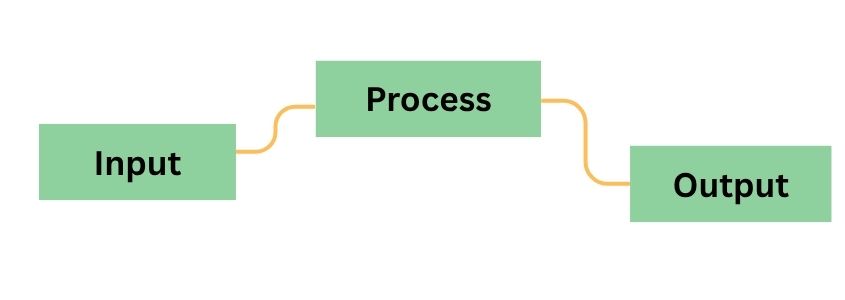
Just like my teacher explained that day, a computer is an electronic machine that takes instructions (input), processes them, and shows results (output). It can also save information for later use.
A Simple Analogy
Think of a computer like a kitchen:
- You give ingredients → Input
- The chef (CPU) follows a recipe → Processing
- The food is served → Output
- Leftovers are kept in the fridge → Storage
Computers help you type, calculate, browse, learn, play games, and communicate — quickly and accurately and much more than you think.
How Does a Computer Work?
Computers follow four basic steps:
- Input – You give data or commands using a keyboard, mouse, touchscreen, etc.
- Processing – The CPU (Central Processing Unit) works on the data.
- Output – The result is shown on a screen, speaker, or printer.
- Storage – Data is saved temporarily (in RAM – Random Access Memory) or permanently (in hard drives or SSDs – Solid State Drive).
Everything from typing a message to playing music follows this cycle.
Key Features of a Computer
Computers are powerful because they are:
- Fast – They handle millions of tasks in seconds
- Accurate – They give correct results with correct input
- Automatic – They follow instructions on their own
- Multitasking – They run many programs at once
- Storage-friendly – They hold lots of data
- Reliable – They work consistently without breaks
Main Parts of a Computer
Here are the basic components and their functions:
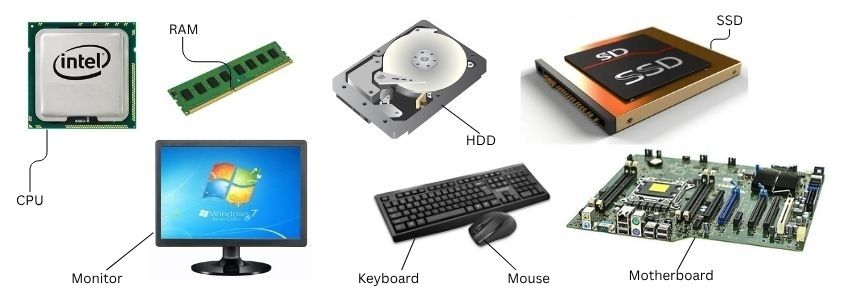
| Component | Purpose |
| CPU | The brain; processes all instructions |
| RAM | Temporary memory used during tasks |
| Hard Drive / SSD | Stores files and software long term |
| Monitor | Displays output (text, images, videos) |
| Keyboard & Mouse | Input devices to give commands |
| Motherboard | Connects all parts of the computer |
Types of Computers
Different types of computers are used for different purposes. From supercomputers to personal computers, each has unique roles in daily life and industries.
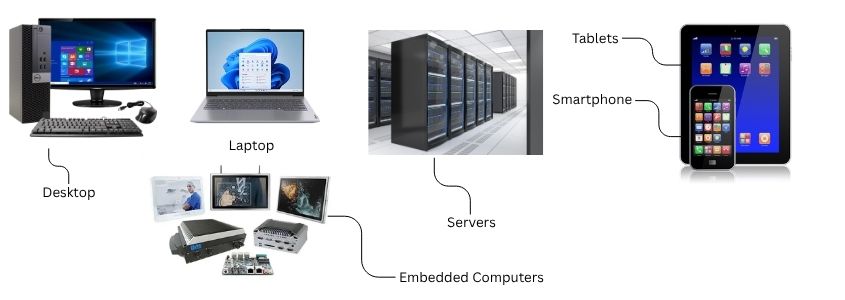
- Desktops – Powerful, used in homes and offices.
- Laptops – Portable and great for learning or working on the go.
- Tablets & Smartphones – Small, touchscreen devices used every day.
- Servers – Large computers used by businesses to store data.
- Embedded Computers – Built into machines like ATMs, washing machines, and TVs.
You can learn more in our comprehensive guide to Types of Computer
Where Are Computers Used?
Computers are used in many places, including:
| Place | Usage |
| Schools | Online classes, digital exams, projects |
| Offices | Documents, meetings, software development |
| Banks | ATMs, account management, transactions |
| Hospitals | Patient records, lab results, imaging |
| Homes | Entertainment, study, shopping, communication |
Why Learn About Computers?
No matter your age or background, learning computers is important:
- Most jobs now require digital skills
- You can study, work, and communicate more easily
- Services like online learning and banking need basic computer use
- It builds confidence with devices like phones, tablets, and laptops
Final Thoughts
Learning what a computer is may seem confusing at first, but it’s actually simple. Computers are designed to help us in school, at work, and in daily life.
Take it one step at a time — and you’ll see just how fun and useful the digital world can be!